
Reverse Engineering the Dash Learning Robot
I brushed up on my Ghidra to add to the open source interface for a Dash robot I found at Goodwill. Finally, another thrift store project!
Since Making a Turtle Bot 1: Hacking a Mint Cleaner, I’ve been keeping an eye out for other cheap robotic vacuums to play with. On a recent trip, I noticed a decent looking robot in the toy section for $15 https://store.makewonder.com/products/dash. A quick search showed the company was still in business and there was a repo that at least claimed to offer Python controls. I figured worse case, I could replace the controller and use it for its motors.
If you just want to use the library I updated for controlling the Dash in Python, see: https://github.com/axlan/WonderPy
Dash Robot Used as Intended
First, I gave it a spin using it as intended. It is meant to be controlled through an app and has a pretty nice remote control and visual programming language. Everything seemed to be working and already had a pretty neat toy out of my purchase.
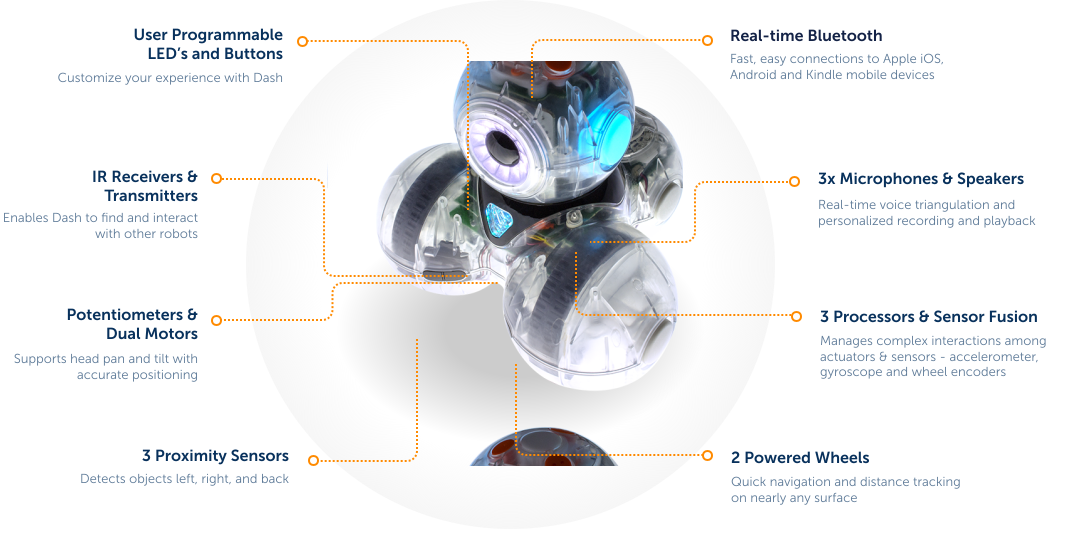
Here’s an Overview of its features:
Commercial Educational Robot Toys
I can’t really say where the Dash falls in the ranking of learning robot toys. Its ecosystem seems fine, and the bot is cute while still having a bunch of features. On the other hand, I have a strong bias toward wanting something that’s an open system.
- They are more likely to teach generalizable skills
- They can more easily outlive their parent company
- Their incentives are better aligned to be good rather than sticky
- They’re more likely to be interoperable with other systems widening the play space
That is how I justify it anyway.
The Official Python Interface
Much to their credit, the MakeWonder company released an official Python library.
https://github.com/playi/WonderPy
Rather than being cutesy, or a stripped down basic interface, it breaks out all the controls and sensors in a reasonable way. It even covers overlapping functionality to expose high level features like getting a position estimate and moving to a certain pose as well as low level features like motor control and accelerometer readings.
Here’s the documentation of the features it covers: https://github.com/playi/WonderPy/blob/master/doc/WonderPy.md
They even have some handy diagrams for the coordinate system: https://github.com/playi/WonderPy/blob/master/doc/WonderPy.md#coordinate-systems
This would more than cover all the features I wanted for my turtle bot. The catch is that it only works in Python 2 on x86 OSX.
Porting the Library
I found a few efforts to port the library to Python 3 and other OSs.
- https://github.com/IlyaSukhanov/morseapi - As far as I can tell, this was the only real reverse engineering effort. I hadn’t looked at it in detail until writing this article, since I figured the forks would have been mostly additive. As it turned out, this project has more functionality then its “children” and even had a partial implementation of the command I was interested in.
- https://github.com/havnfun/python-dash-robot - Is built on the previous project. It adds Python 3 compatibility along with dropping a bunch of the previously supported commands and sensors
- https://github.com/mewmix/bleak-dash - Is built on the previous projects. Switches the BlueTooth support library and adds back the some of the sensor decoding
Since I assumed the latest project would be the most complete, I used it as my starting point. In testing, the movement commands worked, but even doing something as simple as turning 90 degrees wasn’t easy to achieve. Instead of using the high level pose command like the original library, it used low level motor control in a way that didn’t seem well tuned.
To illustrate here’s the evolution of the turning command:
1
2
3
4
5
6
7
8
9
10
11
12
13
14
15
16
17
18
19
20
21
22
23
24
25
26
27
28
29
30
31
32
33
34
35
36
37
38
39
40
41
42
43
44
45
46
47
48
49
50
51
52
53
54
55
56
57
58
59
60
61
62
63
64
65
66
67
# https://github.com/playi/WonderPy
# This uses the robot's pose command to turn the robot in place.
def do_turn(self, deg, speed_deg_s):
    """
    This is a somewhat naive drive command because it moves relative to the robot's measured position,
    which means error can accumulate.
    """
    self.do_pose(0, 0, deg, abs(float(deg)) / float(speed_deg_s), True,
                  WWRobotConstants.WWPoseMode.WW_POSE_MODE_RELATIVE_MEASURED,
                  WWRobotConstants.WWPoseDirection.WW_POSE_DIRECTION_INFERRED,
                  False)


# https://github.com/IlyaSukhanov/morseapi
# This still uses the pose command, but the command no longer actually maps to the full pose.
# It appears that only relative movements are supported and some of the other flags are missing.
def turn(self, degrees, speed_dps=(360/2.094)):
    """
    Turn Dash specified distance.

    This is a blocking call.

    :param degrees: How many degrees to turn.
    Positive values spin clockwise and negative counter-clockwise.
    :param speed: Speed to turn at, in degrees/second
    """
    if abs(degrees) > 360:
        raise NotImplementedError("Cannot turn more than one rotation per move")
    if degrees:
        seconds = abs(degrees/speed_dps)

        # def _get_move_byte_array(distance_mm=0, degrees=0, seconds=1.0, eight_byte=0x80):
        byte_array = _get_move_byte_array(degrees=degrees, seconds=seconds)
        self.command("move", byte_array)
        # self.sleep does not work and api says not to use time.sleep...
        time.sleep(seconds)


# https://github.com/mewmix/bleak-dash
# This is the worst of all since it uses the drive command to try to spin the
# wheels open-loop, and doesn't appear to make logical sense since the speed_dps
# used to compute duration isn't related to the actual speed applied to the motors.
async def turn(self, degrees, speed_dps=360/2.094):
    """
    Turns the robot a specific number of degrees at a certain speed.
    This method simplifies the operation to a 'spin' command for a calculated duration.
    Adjust this method based on your robot's capabilities.
    """
    if abs(degrees) > 360:
        print("Cannot turn more than one rotation per move")
        return

    # Assuming positive degrees for clockwise, negative for counter-clockwise
    speed = 200 if degrees > 0 else -200
    # Calculate duration based on speed and degrees to turn
    duration = abs(degrees / speed_dps)
    speed = max(-2048, speed)
    speed = min(2048, speed)
    if speed < 0:
        speed = 0x8000 + abs(speed)  # Adjust for negative speeds if necessary
    await self.command("drive", bytearray([
        0x00,  # Placeholder for potential additional parameters
        speed & 0xff,
        (speed >> 8) & 0xff
    ]))
    await asyncio.sleep(duration)
    await self.stop()
I originally assumed that these ports were rewriting the original Python implementation. However the original Python code doesn’t generate the commands to send to the robot directly. It builds a JSON string that it passes to a native OSX binary library that generates the binary data to send to the robot over Bluetooth.
This explains why the original library was so limited and why the ports mostly just remix each other. If I wanted to get robust controls, I’d need to do some reverse engineering myself.
Reverse Engineering
The authors of the previous ports don’t explain how they reverse engineered the existing features. Only https://github.com/IlyaSukhanov/morseapi seems to have actually done original work and he describes it as a process of trial and error, looking at the binary data sent when doing certain behaviors.
While they don’t go into details as far as I can tell, the two ways I’d guess they might have tried would be:
- Spy on the BlueTooth packets sent when using the android app (For example: https://www.instructables.com/Reverse-Engineering-Smart-Bluetooth-Low-Energy-Dev/)
- Use the original Python library on OSX and capture the binary data from various commands
Since I didn’t have a suitable OSX machine, the second option was out.
While capturing the Android BlueTooth packets sounded interesting (and might be the only way for some other devices), it would be a lot of tedious trial and error.
Rather than take either of these approaches, I decided to go back to the original program. Since the JSON commands were already very comprehensive, I predicted that reverse engineering the OSX dylib wouldn’t be too hard. This is mostly due to the JSON being all string based. Somewhere the key value pairs being sent would be mapped to the command data.
The file I needed to decompile is: https://github.com/playi/WonderPy/blob/master/WonderPy/lib/WonderWorkshop/osx/libWWHAL.dylib
While I haven’t done any serious decompiling in the past, I had used the NSA open source decompiler Ghidra for some capture the flag reverse engineering games. Decompiling dylibs is supported out of the box, so I imported the library and gave it a go. Fortunately, the function names were compiled into the library, so I had a decent amount of context to understand the call trees.
I probably only know a fraction of Ghidra’s functionality, and I’m not going to be going step by step through the menus. In general I only used a few features.
- The Symbol Tree - This is a list of the namespaces functions and other symbols in the binary. I would filter by the word (e.x. “pose”) and look at the decompilation of the functions with relevant names.
- Search - I could search the binary for certain strings and see where they’re used. This is especially helpful since I knew exact JSON key names to look for.
- In the decompilation window I would select variables and edit their names. I’d double click functions to go to their implementations.
- To find a functions caller, I’d right click and search for the places that reference it.
- The most advanced thing I’d do is edit data types. This let me specify the fields in a struct so Ghidra can figure out what members pointers are referencing.
The first thing I did was find where the strings for the keys related to the commands were being used. I started with a command that was fully supported in the unofficial ports to check that the JSON was turning into the expected binary packets.
1
2
3
4
5
6
7
8
9
10
11
12
13
14
15
16
17
18
19
20
21
22
23
24
void __thiscall
APICore::BotMessengerBuffer::parseBodyWheels
          (BotMessengerBuffer *this,nx_json *param_1,HALMotorWheel_t *param_2,HALMotorWheel_t *param_3)

{
  int iVar1;
  cnx_json har *lVar2;
  int local_2c;

  if ((param_2 != (HALMotorWheel_t *)0x0) && (param_3 != (HALMotorWheel_t *)0x0)) {
    for (local_2c = 0; local_2c < *(int *)(param_1 + 0x28); local_2c = local_2c + 1) {
      lVar2 = _nx_json_item(param_1,local_2c);
      iVar1 = _strcmp((char *)(lVar2 + 8),"left_cm_s");
      if (iVar1 == 0) {
        *(undefined8 *)(param_2 + 8) = *(undefined8 *)(lVar2 + 0x20);
      }
      iVar1 = _strcmp((char *)(lVar2 + 8),"right_cm_s");
      if (iVar1 == 0) {
        *(undefined8 *)(param_3 + 8) = *(undefined8 *)(lVar2 + 0x20);
      }
    }
  }
  return;
}
A quick Google found that the nx_json refers to the https://github.com/thestr4ng3r/nxjson C JSON library which helpfully lists its structure definition in the README:
1
2
3
4
5
6
7
8
9
10
11
12
13
14
15
16
17
18
19
20
typedef enum nx_json_type {
  NX_JSON_NULL,    // this is null value
  NX_JSON_OBJECT,  // this is an object; properties can be found in child nodes
  NX_JSON_ARRAY,   // this is an array; items can be found in child nodes
  NX_JSON_STRING,  // this is a string; value can be found in text_value field
  NX_JSON_INTEGER, // this is an integer; value can be found in int_value field
  NX_JSON_DOUBLE,  // this is a double; value can be found in dbl_value field
  NX_JSON_BOOL     // this is a boolean; value can be found in int_value field
} nx_json_type;

typedef struct nx_json {
  nx_json_type type;       // type of json node, see above
  const char* key;         // key of the property; for object's children only
  const char* text_value;  // text value of STRING node
  long int_value;          // the value of INTEGER or BOOL node
  double dbl_value;        // the value of DOUBLE node
  int length;              // number of children of OBJECT or ARRAY
  nx_json* child;          // points to first child
  nx_json* next;           // points to next child
} nx_json;
With this I could define the structure of nx_json in Ghidra
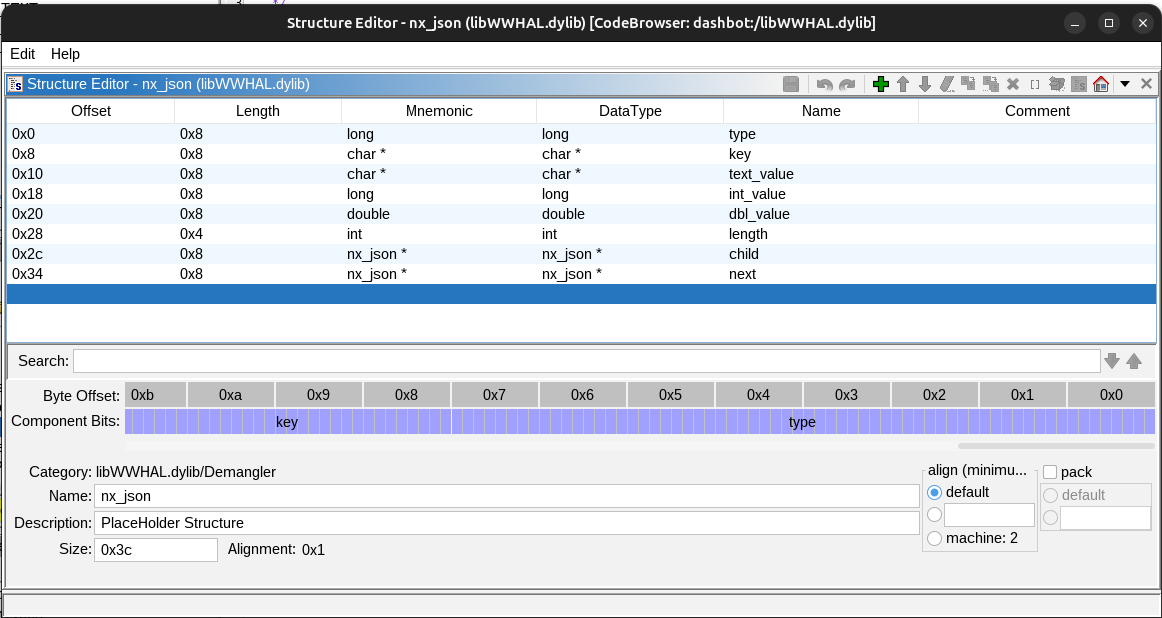
and simplify the function to:
1
2
3
4
5
6
7
8
9
10
11
12
13
14
15
16
17
18
19
20
21
22
23
24
void __thiscall
APICore::BotMessengerBuffer::parseBodyWheels
          (BotMessengerBuffer *this,nx_json *param_1,HALMotorWheel_t *param_2,
          HALMotorWheel_t *param_3)
{
  int iVar1;
  nx_json *lVar2;
  int local_2c;

  if ((param_2 != (HALMotorWheel_t *)0x0) && (param_3 != (HALMotorWheel_t *)0x0)) {
    for (local_2c = 0; local_2c < param_1->length; local_2c = local_2c + 1) {
      lVar2 = (nx_json *)_nx_json_item(param_1,local_2c);
      iVar1 = _strcmp(lVar2->key,"left_cm_s");
      if (iVar1 == 0) {
        *(double *)(param_2 + 8) = lVar2->dbl_value;
      }
      iVar1 = _strcmp(lVar2->key,"right_cm_s");
      if (iVar1 == 0) {
        *(double *)(param_3 + 8) = lVar2->dbl_value;
      }
    }
  }
  return;
}
This is pretty readable without doing the extra steps to guess the structure of HALMotorWheel_t and give the variables nicer names. This already was fairly different from the Python code. These values are being stored as doubles, and they don’t appear to be directly being used to build the packet structure that gets sent to the Robot. That means that the parsing process is more complicated.
Looking at the references to parseBodyWheels I found :
1
2
3
4
5
6
7
8
9
10
11
12
13
14
15
16
17
18
19
20
21
22
23
24
25
26
27
28
29
30
31
32
33
34
35
36
37
38
39
40
41
42
43
44
45
46
47
48
49
50
51
52
53
54
55
56
57
58
59
60
61
62
63
64
65
66
67
68
69
70
71
72
73
74
75
76
77
78
79
80
81
82
83
84
85
86
87
88
89
90
91
92
93
94
95
96
97
98
99
100
101
102
103
104
105
106
107
108
109
110
111
112
113
114
115
116
117
118
119
120
121
122
123
124
125
126
127
128
129
130
131
132
133
134
135
136
137
138
139
140
141
142
143
144
145
146
147
148
149
150
151
152
153
154
155
156
157
158
159
160
161
162
163
164
165
166
167
168
169
170
171
172
173
174
175
176
// A bunch of intermediate variables are removed for brevity.
nx_json * APICore::BotMessengerBuffer::convertCtlrMessageToPackets(nx_json *param_1)
{
  RobotHW *this;
  Ctlr2BotMsg *this_00;
  ...
  HALPamplemousse_t *local_1a8;
  HALAudioSynth_t *local_1a0;
  HALPing_t *local_198;
  HALPower_t *local_190;
  HALBodyPose_t *local_188;
  HALBodyMotionLinearAngular_t *local_180;
  HALUserSetting_t *local_178;
  HALAnim_t *local_170;
  HALSpeaker_t *local_168;
  HALEyeRing_t *local_160;
  HALRGB_t *local_158;
  HALLED3_t *local_150;
  HALLED_t *local_148;
  HALMotorWheel_t *local_140;
  HALMotorWheel_t *local_138;
  HALMotorWheel_t *local_130;
  HALComponentScalar_t *local_128;
  HALMotorServo_t *local_120;
  HALMotorServo_t *local_118;
  HALLedMsg_t *local_108;
  HALLauncher_t *local_100;

  HAL::Ctlr2BotMsg::Ctlr2BotMsg(this_00);
  HAL::RobotHW::initComponentsForCtlr2BotMsg((RobotHW *)in_RSI->dbl_value,this_00);

  do {
    if (local_d0[10] <= local_e8) {
      local_1b1 = 0;
      HAL::RobotHW::packetizeCtlr2BotMsg((Ctlr2BotMsg *)param_1);
      std::shared_ptr<>::shared_ptr<>((shared_ptr<> *)&local_1c8,local_d8,0);

      return param_1;
    }
    local_f0 = (nx_json *)_nx_json_item(local_d0,local_e8);
    local_f4 = _atoi(local_f0->key);
    if (local_f4 == 1) {
      local_190 = (HALPower_t *)HAL::Ctlr2BotMsg::getPowerStorage(local_d8,1);
      parsePower((BotMessengerBuffer *)in_RSI,local_f0,local_190);
    }
    else if (local_f4 == 100) {
      local_160 = (HALEyeRing_t *)HAL::Ctlr2BotMsg::getEyeRingStorage(local_d8,100);
      parseEyeRing((BotMessengerBuffer *)in_RSI,local_f0,local_160);
    }
    else if (local_f4 - 0x65 < 4) {
LAB_000662f5:
      local_158 = (HALRGB_t *)HAL::Ctlr2BotMsg::getRGBStorage(local_d8,local_f4);
      parseLightRGB((BotMessengerBuffer *)in_RSI,local_f0,local_158);
    }
    else if (local_f4 - 0x69 < 2) {
LAB_00066285:
      local_148 = (HALLED_t *)HAL::Ctlr2BotMsg::getLEDStorage(local_d8,local_f4);
      parseLightLED((BotMessengerBuffer *)in_RSI,local_f0,local_148);
    }
    else {
      if (local_f4 == 0x6b) goto LAB_000662f5;
      if (local_f4 == 0x6c) {
        local_150 = (HALLED3_t *)HAL::Ctlr2BotMsg::getLED3Storage(local_d8,0x6c);
        parseLightLED3((BotMessengerBuffer *)in_RSI,local_f0,local_150);
      }
      else {
        if (local_f4 - 0x6d < 3) goto LAB_00066285;
        if (local_f4 - 200 < 2) {
          local_130 = (HALMotorWheel_t *)HAL::Ctlr2BotMsg::getMotorWheelStorage(local_d8,local_f4);
          parseMotorWheel((BotMessengerBuffer *)in_RSI,local_f0,local_130);
        }
        else {
          if (local_f4 == 0xca) goto LAB_00066187;
          if (local_f4 == 0xcb) goto LAB_0006614f;
          if (local_f4 == 0xcc) {
            local_180 = (HALBodyMotionLinearAngular_t *)
                        HAL::Ctlr2BotMsg::getBodyMotionLinearAngularStorage(local_d8,0xcc);
            parseBodyMotionLinearAngular((BotMessengerBuffer *)in_RSI,local_f0,local_180);
          }
          else if (local_f4 == 0xcd) {
            local_188 = (HALBodyPose_t *)HAL::Ctlr2BotMsg::getBodyPoseStorage(local_d8,0xcd);
            parseBodyPose((BotMessengerBuffer *)in_RSI,local_f0,local_188);
          }
          else if (local_f4 == 0xce) {
LAB_00066187:
            local_120 = (HALMotorServo_t *)HAL::Ctlr2BotMsg::getMotorServoStorage(local_d8,local_f4)
            ;
            parseMotorHeadTiltServo((BotMessengerBuffer *)in_RSI,local_f0,local_120);
          }
          else {
            if (local_f4 != 0xcf) {
              if (local_f4 == 0xd0) goto LAB_00066187;
              if (local_f4 != 0xd1) {
                if (local_f4 == 0xd2) {
LAB_00066117:
                  local_110 = HAL::Ctlr2BotMsg::getNoParamsStorage(local_d8,local_f4);
                  parseNoParams(in_RSI,(HALNoParams_t *)local_f0);
                }
                else if (local_f4 == 0xd3) {
                  local_138 = (HALMotorWheel_t *)
                              HAL::Ctlr2BotMsg::getMotorWheelStorage(local_d8,200);
                  local_140 = (HALMotorWheel_t *)
                              HAL::Ctlr2BotMsg::getMotorWheelStorage(local_d8,0xc9);
                  parseBodyWheels((BotMessengerBuffer *)in_RSI,local_f0,local_138,local_140);
                }
                else {
                  if (local_f4 == 0xd4) goto LAB_00066117;
                  if (local_f4 - 0xd5 < 2) {
                    local_128 = (HALComponentScalar_t *)
                                HAL::Ctlr2BotMsg::getScalarStorage(local_d8,local_f4);
                    parseScalarPercentage((BotMessengerBuffer *)in_RSI,local_f0,local_128);
                  }
                  else if (local_f4 == 300) {
                    local_168 = (HALSpeaker_t *)HAL::Ctlr2BotMsg::getSpeakerStorage(local_d8,300);
                    parseSpeaker((BotMessengerBuffer *)in_RSI,local_f0,local_168);
                  }
                  else if (local_f4 == 0x12d) {
                    local_170 = (HALAnim_t *)HAL::Ctlr2BotMsg::getAnimStorage(local_d8,0x12d);
                    parseOnRobotAnim((BotMessengerBuffer *)in_RSI,local_f0,local_170);
                  }
                  else if (local_f4 == 0x130) {
                    local_1a0 = (HALAudioSynth_t *)
                                HAL::Ctlr2BotMsg::getAudioSynthStorage(local_d8,0x130);
                    parseAudioSynth((BotMessengerBuffer *)in_RSI,local_f0,local_1a0);
                  }
                  else if (local_f4 - 400 < 2) {
                    local_100 = (HALLauncher_t *)
                                HAL::Ctlr2BotMsg::getLauncherStorage(local_d8,local_f4);
                    parseLauncher((BotMessengerBuffer *)in_RSI,local_f0,local_100);
                  }
                  else if (local_f4 == 0x19a) {
                    local_108 = (HALLedMsg_t *)HAL::Ctlr2BotMsg::getLedMsgStorage(local_d8,0x19a);
                    parseLedMsg((BotMessengerBuffer *)in_RSI,local_f0,local_108);
                  }
                  else if (local_f4 == 0x1c2) {
                    local_1a8 = (HALPamplemousse_t *)
                                HAL::Ctlr2BotMsg::getPamplemousseStorage(local_d8,0x1c2);
                    parsePamplemousseStart((BotMessengerBuffer *)in_RSI,local_f0,local_1a8);
                  }
                  else if (local_f4 == 0x1c3) {
                    local_1b0 = (HALPamplemousse_t *)
                                HAL::Ctlr2BotMsg::getPamplemousseStorage(local_d8,0x1c3);
                    parsePamplemousseStop((BotMessengerBuffer *)in_RSI,local_f0,local_1b0);
                  }
                  else if (local_f4 == 5000) {
                    local_178 = (HALUserSetting_t *)
                                HAL::Ctlr2BotMsg::getUserSettingsStorage(local_d8,5000);
                    parseUserSettings((BotMessengerBuffer *)in_RSI,local_f0,local_178);
                  }
                  else if (local_f4 == 9000) {
                    local_198 = (HALPing_t *)HAL::Ctlr2BotMsg::getPingStorage(local_d8,9000);
                    parsePing((BotMessengerBuffer *)in_RSI,local_f0,local_198);
                  }
                  else {
                    _printf("unknown component id: %d",(ulong)local_f4);
                    _printf("\n");
                  }
                }
                goto LAB_000665c3;
              }
            }
LAB_0006614f:
            local_118 = (HALMotorServo_t *)HAL::Ctlr2BotMsg::getMotorServoStorage(local_d8,local_f4)
            ;
            parseMotorHeadPanServo((BotMessengerBuffer *)in_RSI,local_f0,local_118);
          }
        }
      }
    }
LAB_000665c3:
    this = (RobotHW *)in_RSI->dbl_value;
    pvVar1 = (void *)HAL::Ctlr2BotMsg::GetHwData(local_d8);
    HAL::RobotHW::setCommand(this,pvVar1,local_f4);
    local_e8 = local_e8 + 1;
  } while( true );
}
For my purposes this is the top level function. It does the following:
- Initialize a
Ctlr2BotMsg. This has the storage for all the messages that might be sent. - Loop through the JSON and set the values in the corresponding HAL structure in
Ctlr2BotMsg. - After setting the data for the each command call
setCommand. - Once all the commands have been setup, call
packetizeCtlr2BotMsg.
The first thing I looked for, was where the commands were being mapped to command IDs that we see in the Python port:
1
2
3
4
5
6
7
8
9
10
11
12
13
14
15
16
17
COMMANDS = {
    "neck_color":0x03,
    "tail_brightness":0x04,
    "eye_brightness":0x08,
    "eye":0x09,
    "left_ear_color":0x0b,
    "right_ear_color":0x0c,
    "head_color":0x0d,
    "head_pitch":0x07,
    "head_yaw":0x06,
    "pose":0x23,
    "say":0x18,
    "beep":0x19,
    "drive":0x02,
    "move":0x23,
    "reset":0xc8,
}
The JSON uses different integers to identify the commands:
1
2
3
4
5
6
7
8
9
10
11
12
13
14
15
16
17
18
19
20
21
22
23
24
25
26
27
28
29
class RobotComponent(object):
        WW_COMMAND_POWER                      =    '1'
        WW_COMMAND_EYE_RING                   =  '100'
        WW_COMMAND_LIGHT_RGB_EYE              =  '101'
        WW_COMMAND_LIGHT_RGB_LEFT_EAR         =  '102'
        WW_COMMAND_LIGHT_RGB_RIGHT_EAR        =  '103'
        WW_COMMAND_LIGHT_RGB_CHEST            =  '104'
        WW_COMMAND_LIGHT_MONO_TAIL            =  '105'
        WW_COMMAND_LIGHT_MONO_BUTTON_MAIN     =  '106'
        WW_COMMAND_LIGHT_RGB_BUTTON_MAIN      =  '107'
        WW_COMMAND_LIGHT_MONO_BUTTONS         =  '108'
        WW_COMMAND_LIGHT_MONO_BUTTON_1        =  '109'  # cue button light - circle
        WW_COMMAND_LIGHT_MONO_BUTTON_2        =  '110'  # cue button light - square
        WW_COMMAND_LIGHT_MONO_BUTTON_3        =  '111'  # cue button light - triangle
        WW_COMMAND_HEAD_POSITION_TILT         =  '202'
        WW_COMMAND_HEAD_POSITION_PAN          =  '203'
        WW_COMMAND_BODY_LINEAR_ANGULAR        =  '204'
        WW_COMMAND_BODY_POSE                  =  '205'
        WW_COMMAND_MOTOR_HEAD_BANG            =  '210'
        WW_COMMAND_BODY_WHEELS                =  '211'
        WW_COMMAND_BODY_COAST                 =  '212'
        WW_COMMAND_HEAD_PAN_VOLTAGE           =  '213'
        WW_COMMAND_HEAD_TILT_VOLTAGE          =  '214'
        WW_COMMAND_SPEAKER                    =  '300'
        WW_COMMAND_ON_ROBOT_ANIM              =  '301'
        WW_COMMAND_LAUNCHER_FLING             =  '400'
        WW_COMMAND_LAUNCHER_RELOAD            =  '401'
        WW_COMMAND_LED_MESSAGE                =  '410'
        WW_COMMAND_SET_PING                   = '9000'
The JSON integers can be seen (as hex) in convertCtlrMessageToPackets which makes sense. They are also referenced in setCommand:
1
2
3
4
5
6
7
8
9
10
11
12
13
14
15
16
17
18
19
20
21
22
23
24
25
26
27
28
29
30
31
32
33
34
35
36
37
38
void HAL::RobotHW_rev0::setCommand(void *cmd_data,uint cmd_id)
{
  size_t sVar1;

  if (cmd_data != (void *)0x0) {
    if (cmd_id == 1) {
      *(ulong *)cmd_data = *(ulong *)cmd_data | 0x8000;
      *(undefined1 *)((long)cmd_data + 0x28c) = 1;
    }
    else if (cmd_id == 100) {
      if (*(int *)((long)cmd_data + 0x70) == 0) {
        *(ulong *)cmd_data = *(ulong *)cmd_data | 0x100;
      }
      else if (*(int *)((long)cmd_data + 0x70) == 1) {
        *(ulong *)cmd_data = *(ulong *)cmd_data | 0x80000000000;
      }
      else {
        _printf("error: unsupported brightnessMode: %d\n",(ulong)*(uint *)((long)cmd_data + 0x70));
        *(ulong *)cmd_data = *(ulong *)cmd_data | 0x100;
      }
      if (*(int *)((long)cmd_data + 0x58) == 0xffff) {
        *(ulong *)cmd_data = *(ulong *)cmd_data | 0x200;
        *(ulong *)cmd_data = *(ulong *)cmd_data & 0xfffffffffffffbff;
      }
      else {
        *(ulong *)cmd_data = *(ulong *)cmd_data | 0x400;
        *(ulong *)cmd_data = *(ulong *)cmd_data & 0xfffffffffffffdff;
      }
      *(undefined1 *)((long)cmd_data + 0x54) = 1;
    }
    else {
      if (cmd_id != 0x65) {
        if (cmd_id == 0x66) {
          *(ulong *)cmd_data = *(ulong *)cmd_data | 0x800;
          *(undefined1 *)((long)cmd_data + 0x84) = 1;
          return;
        }
...
Here the JSON commands are mapped to the one or more bit mask flags.
These flags are then checked in packetizeCtlr2BotMsg. The pose command I’m interested in has the JSON ID of 0xCD, which sets the bit flag 0x20000. In packetizeCtlr2BotMsg this is handled in this snippet.
1
2
3
4
5
6
7
8
9
10
11
12
13
14
15
16
17
18
19
20
21
22
23
24
25
26
27
28
29
30
31
32
33
uVar19 = testAndClearCommandMaskBit(prVar25,0x20000);
if ((uVar19 & 1) != 0) {
  uVar17 = *(int *)(msg_hw_ptr + 0x2f8);
  if ((uVar17 == 0) || (local_688 = uVar17 + -6, uVar17 - 2U < 4)) {
    *(double *)local_200 = 0.0;
  }
  for (i = 0; i < 3; i = i + 1) {
    if ((*(int *)(msg_hw_ptr + 0x2f8) == 3) || (*(int *)(msg_hw_ptr + 0x2f8) == 4)) {
      local_3e0 = 9;
      if (8 < 0x14U - *(int *)(msg_hw_ptr + (long)i * 0x18 + 8)) {
        if (*(int *)(msg_hw_ptr + 0x2f8) == 3) {
          local_3e1 = (robot_hw0_cmd_data)0x17;
        }
        else {
          local_3e1 = (robot_hw0_cmd_data)0x29;
        }
        local_690 = *(double *)(msg_hw_ptr + 0x2d8) * 10.0;
        if (32767.0 <= local_690) {
          local_690 = 32767.0;
        }
        if (local_690 <= -32768.0) {
          local_698 = -32768.0;
        }
        else {
          local_698 = local_690;
        }
        ...
        msg_hw_ptr[(ulong)*(uint *)(msg_hw_ptr + (long)i * 0x18 + 8) + (long)i * 0x18 + 0xc] =
              local_3e1;
        msg_hw_ptr
        [(ulong)(*(int *)(msg_hw_ptr + (long)i * 0x18 + 8) + 1) + (long)i * 0x18 + 0xc] =
              SUB21((ushort)local_40a >> 8,0);
        ...
Based on parseBodyPose, I’d already created a data type for the pose data. It appeared that the data parsed from the JSON was being accessed here and serialized into the packet to send to the robot. I made a new data type to map the pose data to the right offset
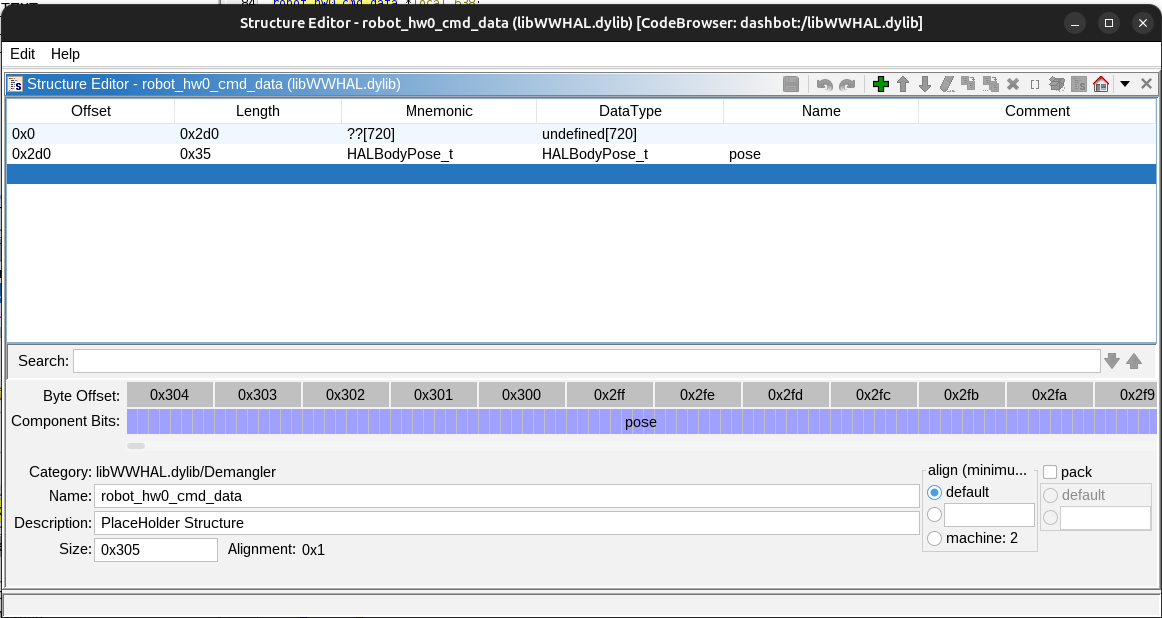
and made this block much clearer:
1
2
3
4
5
6
7
8
9
10
11
12
13
14
15
16
17
18
19
20
21
22
23
24
25
26
27
28
29
30
31
32
33
34
35
36
37
38
39
40
41
42
43
44
45
46
47
48
49
50
51
52
53
54
55
56
57
58
59
60
61
62
63
64
65
66
67
68
69
70
71
72
73
74
75
76
77
78
79
80
81
82
83
84
85
86
87
88
89
90
91
92
93
94
95
96
97
98
99
100
101
102
103
104
105
106
107
108
109
uVar20 = testAndClearCommandMaskBit(prVar12,0x20000);
if ((uVar20 & 1) != 0) {
  mode = (msg_hw_ptr->pose).mode;
  if ((mode == 0) || (local_688 = mode - 6, mode - 2 < 4)) {
    *(double *)local_200 = 0.0;
  }
  for (i = 0; i < 3; i = i + 1) {
    if (((msg_hw_ptr->pose).mode == 3) || ((msg_hw_ptr->pose).mode == 4)) {
      // Logic for generating command to change the global coordinate origin
      ...
    }
    else {
      local_411 = 0x23;
      local_420 = 9;
      if (8 < 0x14U - *(int *)(msg_hw_ptr->field0_0x0 + (long)i * 0x18 + 8)) {
        x_enc = (msg_hw_ptr->pose).x * 10.0;
        local_430 = (msg_hw_ptr->pose).y * 10.0;
        local_438 = (msg_hw_ptr->pose).theta * 100.0;
        local_440 = local_438 - *(double *)local_200;
        local_6d8 = (msg_hw_ptr->pose).time * 1000.0;
        if (65535.0 <= local_6d8) {
          local_6d8 = 65535.0;
        }
        if (local_6d8 <= 0.0) {
          local_6e0 = 0.0;
        }
        else {
          local_6e0 = local_6d8;
        }
        local_448 = local_6e0;
        local_428 = x_enc;
        *(undefined8 *)((long)pppHVar27 + -8) = 0x7e580;
        dVar29 = (double)_round(x_enc);
        x_enc = local_430;
        local_44a = (undefined2)(int)dVar29;
        *(undefined8 *)((long)pppHVar27 + -8) = 0x7e59b;
        dVar29 = (double)_round(x_enc);
        x_enc = local_440;
        local_44c = (undefined2)(int)dVar29;
        *(undefined8 *)((long)pppHVar27 + -8) = 0x7e5b6;
        x_enc = (double)_round(x_enc);
        local_6e2 = (short)(int)x_enc;
        iVar18 = (int)local_448;
        local_450 = (undefined2)iVar18;
        *(double *)local_200 = (double)(int)local_6e2 - local_440;
        msg_hw_ptr->field0_0x0
        [(ulong)*(uint *)(msg_hw_ptr->field0_0x0 + (long)i * 0x18 + 8) + (long)i * 0x18 + 0xc] =
              local_411;
        msg_hw_ptr->field0_0x0
        [(ulong)(*(int *)(msg_hw_ptr->field0_0x0 + (long)i * 0x18 + 8) + 1) +
          (long)i * 0x18 + 0xc] = (char)local_44a;
        msg_hw_ptr->field0_0x0
        [(ulong)(*(int *)(msg_hw_ptr->field0_0x0 + (long)i * 0x18 + 8) + 2) +
          (long)i * 0x18 + 0xc] = (char)local_44c;
        msg_hw_ptr->field0_0x0
        [(ulong)(*(int *)(msg_hw_ptr->field0_0x0 + (long)i * 0x18 + 8) + 3) +
          (long)i * 0x18 + 0xc] = (char)(int)x_enc;
        msg_hw_ptr->field0_0x0
        [(ulong)(*(int *)(msg_hw_ptr->field0_0x0 + (long)i * 0x18 + 8) + 4) +
          (long)i * 0x18 + 0xc] = (char)((uint)iVar18 >> 8);
        msg_hw_ptr->field0_0x0
        [(ulong)(*(int *)(msg_hw_ptr->field0_0x0 + (long)i * 0x18 + 8) + 5) +
          (long)i * 0x18 + 0xc] = (char)iVar18;
        msg_hw_ptr->field0_0x0
        [(ulong)(*(int *)(msg_hw_ptr->field0_0x0 + (long)i * 0x18 + 8) + 6) +
          (long)i * 0x18 + 0xc] = (byte)((ushort)local_44a >> 8) & 0x3f;
        msg_hw_ptr->field0_0x0
        [(ulong)(*(int *)(msg_hw_ptr->field0_0x0 + (long)i * 0x18 + 8) + 7) +
          (long)i * 0x18 + 0xc] = (byte)((ushort)local_44c >> 8) & 0x3f;
        uVar20 = (ulong)(*(int *)(msg_hw_ptr->field0_0x0 + (long)i * 0x18 + 8) + 6);
        msg_hw_ptr->field0_0x0[uVar20 + (long)i * 0x18 + 0xc] =
              msg_hw_ptr->field0_0x0[uVar20 + (long)i * 0x18 + 0xc] |
              (byte)(local_6e2 >> 2) & 0xc0;
        uVar20 = (ulong)(*(int *)(msg_hw_ptr->field0_0x0 + (long)i * 0x18 + 8) + 7);
        msg_hw_ptr->field0_0x0[uVar20 + (long)i * 0x18 + 0xc] =
              msg_hw_ptr->field0_0x0[uVar20 + (long)i * 0x18 + 0xc] |
              (byte)(local_6e2 >> 4) & 0xc0;
        msg_hw_ptr->field0_0x0
        [(ulong)(*(int *)(msg_hw_ptr->field0_0x0 + (long)i * 0x18 + 8) + 8) +
          (long)i * 0x18 + 0xc] = 0;
        if ((msg_hw_ptr->pose).mode == 5) {
          local_6e8 = 3;
        }
        else {
          local_6e8 = (msg_hw_ptr->pose).mode;
        }
        uVar20 = (ulong)(*(int *)(msg_hw_ptr->field0_0x0 + (long)i * 0x18 + 8) + 8);
        msg_hw_ptr->field0_0x0[uVar20 + (long)i * 0x18 + 0xc] =
              msg_hw_ptr->field0_0x0[uVar20 + (long)i * 0x18 + 0xc] | (byte)(local_6e8 << 6);
        uVar20 = (ulong)(*(int *)(msg_hw_ptr->field0_0x0 + (long)i * 0x18 + 8) + 8);
        msg_hw_ptr->field0_0x0[uVar20 + (long)i * 0x18 + 0xc] =
              msg_hw_ptr->field0_0x0[uVar20 + (long)i * 0x18 + 0xc] |
              ((msg_hw_ptr->pose).ease & 1) << 5;
        uVar20 = (ulong)(*(int *)(msg_hw_ptr->field0_0x0 + (long)i * 0x18 + 8) + 8);
        msg_hw_ptr->field0_0x0[uVar20 + (long)i * 0x18 + 0xc] =
              msg_hw_ptr->field0_0x0[uVar20 + (long)i * 0x18 + 0xc] |
              (byte)((msg_hw_ptr->pose).wrap_theta << 4);
        uVar20 = (ulong)(*(int *)(msg_hw_ptr->field0_0x0 + (long)i * 0x18 + 8) + 8);
        msg_hw_ptr->field0_0x0[uVar20 + (long)i * 0x18 + 0xc] =
              msg_hw_ptr->field0_0x0[uVar20 + (long)i * 0x18 + 0xc] |
              (byte)(msg_hw_ptr->pose).dir;
        *(int *)(msg_hw_ptr->field0_0x0 + (long)i * 0x18 + 8) =
              *(int *)(msg_hw_ptr->field0_0x0 + (long)i * 0x18 + 8) + (int)local_420;
        local_44e = local_6e2;
        break;
      }
    }
  }
}
The only complicated thing left is where these values are being written to. For some reason, this code loops through the data making three copies. The line:
1
2
3
msg_hw_ptr->field0_0x0
        [(ulong)*(uint *)(msg_hw_ptr->field0_0x0 + (long)i * 0x18 + 8) + (long)i * 0x18 + 0xc] =
              local_411;
Writes the command ID byte 0x23 (which matches the value in the Python port) to an offset in memory. This value appears to be the result of following a pointer to a pointer of the structure that’s building the packets to send. Still, we get the clear sequence of data which can be cleaned up to:
1
2
3
4
5
6
7
8
9
10
11
12
13
14
15
16
17
18
19
20
21
22
23
24
25
26
27
28
29
30
31
32
33
34
35
36
37
38
39
40
41
42
43
44
45
46
47
48
49
50
51
52
53
54
55
56
57
58
59
60
61
62
63
64
// Get base pointer to the buffer
uint8_t *buffer_base = msg_hw_ptr->field0_0x0 + (long)local_3d8 * 0x18 + 0xc;
int *write_offset_ptr = (int *)(msg_hw_ptr->field0_0x0 + (long)local_3d8 * 0x18 + 8);
int write_offset = *write_offset_ptr;

// Initialize tracking variable
*(double *)local_200 = 0.0;

// Packet type/ID
uint8_t packet_id = 0x23;
uint8_t packet_size = 9;

// Scale and prepare pose data
double x_scaled = (msg_hw_ptr->pose).x * 10.0;
double y_scaled = (msg_hw_ptr->pose).y * 10.0;
double theta_scaled = (msg_hw_ptr->pose).theta * 100.0;
double theta_delta = theta_scaled - *(double *)local_200;
double time_ms = (msg_hw_ptr->pose).time * 1000.0;

// Clamp time to uint16 range
if (time_ms >= 65535.0) {
    time_ms = 65535.0;
}
if (time_ms < 0.0) {
    time_ms = 0.0;
}

// Round values for encoding
int16_t x_encoded = (int16_t)round(x_scaled);
int16_t y_encoded = (int16_t)round(y_scaled);
int16_t theta_encoded = (int16_t)round(theta_delta);
uint16_t time_encoded = (uint16_t)time_ms;

// Update tracking variable with rounding error
*(double *)local_200 = (double)theta_encoded - theta_delta;

// Serialize to buffer
buffer_base[write_offset + 0] = packet_id;                              // Byte 0: Packet ID (0x23)
buffer_base[write_offset + 1] = (uint8_t)x_encoded;                     // Byte 1: X low byte
buffer_base[write_offset + 2] = (uint8_t)y_encoded;                     // Byte 2: Y low byte
buffer_base[write_offset + 3] = (uint8_t)theta_encoded;                 // Byte 3: Theta low byte
buffer_base[write_offset + 4] = (uint8_t)(time_encoded >> 8);          // Byte 4: Time high byte
buffer_base[write_offset + 5] = (uint8_t)time_encoded;                  // Byte 5: Time low byte
buffer_base[write_offset + 6] = ((uint8_t)(x_encoded >> 8)) & 0x3F;    // Byte 6: X high 6 bits
buffer_base[write_offset + 7] = ((uint8_t)(y_encoded >> 8)) & 0x3F;    // Byte 7: Y high 6 bits

// Pack theta high bits into bytes 6 and 7
buffer_base[write_offset + 6] |= ((uint8_t)(theta_encoded >> 2)) & 0xC0;  // Theta bits [9:8]
buffer_base[write_offset + 7] |= ((uint8_t)(theta_encoded >> 4)) & 0xC0;  // Theta bits [11:10]

// Initialize control byte
buffer_base[write_offset + 8] = 0;                                      // Byte 8: Control flags

// Handle mode (convert mode 5 to mode 3)
uint8_t mode = ((msg_hw_ptr->pose).mode == 5) ? 3 : (msg_hw_ptr->pose).mode;

// Pack control flags into byte 8
buffer_base[write_offset + 8] |= (mode & 0x03) << 6;                   // Bits [7:6]: mode
buffer_base[write_offset + 8] |= ((msg_hw_ptr->pose).ease & 0x01) << 5;     // Bit 5: ease
buffer_base[write_offset + 8] |= ((msg_hw_ptr->pose).wrap_theta & 0x01) << 4; // Bit 4: wrap_theta
buffer_base[write_offset + 8] |= ((msg_hw_ptr->pose).dir & 0x0F);      // Bits [3:0]: direction

// Update write offset
*write_offset_ptr += packet_size;
This is trivial to port to the Python library to add a more complete version of the missing functionality.
As I continued to read through the original Python library, I realized that the expected behavior was to pack multiple commands into packets up to a max size. This finally let me figure out that the for loop is just writing the command into the next packet with capacity. This gives the extra context for the pose serialization:
1
2
3
4
5
6
7
8
9
10
11
12
13
14
15
16
17
18
19
20
21
22
23
24
25
26
27
28
29
30
31
32
33
34
35
36
37
38
39
40
41
42
43
44
45
46
47
48
49
50
51
52
53
54
55
#define POSE_CMD_BYTE 0x23
#define POSE_CMD_SIZE 9
#define MAX_PACKET_SIZE 20

for (i = 0; i < 3; i++) {
    uint8_t  cmd         = POSE_CMD_BYTE;
    uint8_t  msg_len     = POSE_CMD_SIZE;
    // msg_hw_ptr->packets are the struct:
    // struct Packet {
    //   uint32_t size;
    //   uint8_t data[20];
    // }
    uint8_t  packet_size = msg_hw_ptr->packets[i].size;

    if (packet_size + POSE_CMD_SIZE > MAX_PACKET_SIZE) {
        continue;
    }

    // Scale pose values to fixed-point integers
    int16_t x_enc     = (int16_t)round(msg_hw_ptr->pose.x     * 10.0);
    int16_t y_enc     = (int16_t)round(msg_hw_ptr->pose.y     * 10.0);
    int16_t theta_enc = (int16_t)round(msg_hw_ptr->pose.theta * 100.0);

    // Clamp time to uint16 range
    double time_ms = msg_hw_ptr->pose.time * 1000.0;
    if (time_ms >= 65535.0) time_ms = 65535.0;
    if (time_ms <= 0.0)     time_ms = 0.0;
    uint16_t time_enc = (uint16_t)time_ms;

    // Pack command byte and fixed-point values into packet
    uint8_t *data = &msg_hw_ptr->packets[i].data[packet_size];

    data[0] = cmd;
    data[1] = (uint8_t)(x_enc     & 0xFF);         // x low byte
    data[2] = (uint8_t)(y_enc     & 0xFF);         // y low byte
    data[3] = (uint8_t)(theta_enc & 0xFF);         // theta low byte
    data[4] = (uint8_t)(time_enc  >> 8);           // time high byte
    data[5] = (uint8_t)(time_enc  & 0xFF);         // time low byte
    data[6] = (uint8_t)(x_enc     >> 8) & 0x3F;   // x high bits
    data[7] = (uint8_t)(y_enc     >> 8) & 0x3F;   // y high bits
    data[6] |= (uint8_t)(theta_enc >> 2) & 0xC0;  // theta bits 9:8 -> x high byte bits 7:6
    data[7] |= (uint8_t)(theta_enc >> 4) & 0xC0;  // theta bits 11:10 -> y high byte bits 7:6

    // Pack flags byte
    // Map mode 5 -> 3, otherwise pass through
    uint8_t mode = (msg_hw_ptr->pose.mode == 5) ? 3 : (uint8_t)msg_hw_ptr->pose.mode;
    data[8] = 0;
    data[8] |= (mode                          & 0x03) << 6;  // bits 7:6 = mode
    data[8] |= (msg_hw_ptr->pose.ease         & 0x01) << 5;  // bit  5   = ease
    data[8] |= (msg_hw_ptr->pose.wrap_theta   & 0x01) << 4;  // bit  4   = wrap_theta
    data[8] |= (msg_hw_ptr->pose.dir          & 0x0F);       // bits 3:0 = dir

    msg_hw_ptr->packets[i].size += msg_len;
    break;
}
Systematically Decoding the Commands
Now the I understood the basic structure of the library, I took notes on the all of the commands and the process to encode them:
Ghidra can be a little slow to navigate, so I used its Python API to dump the decompilation of functions that matched a regex: https://gist.github.com/axlan/c38f7b01e54ab9f7cdefea51cd1dc9ed . I included this output in case anyone wants to implement some of the commands I skipped.
With the mapping of the JSON commands to the flags that get set to send the various command packets, it was fairly quick to go through the features I wanted to support and write the serialization in Python.
In doing this investigation I found quite a few commands that weren’t actually referenced in the original Python library. While most were just variations, I found a “Pamplemousse” command that appears to be able to define autonomous behaviors.
Decoding the Sensors
Decoding the sensor data coming from the bot was more straight-forward than encoding the commands. Rather then going through multiple conversion stages, the _deserialize function retrieves the bytes accicociated with each value, and calls the functions to scale them and write them to their corresponding JSON keys.
The infrared distance sensors were a bit interesting. The bot directly reports a value referred to as “reflectance”, but the library had a function for converting this to distance in cm. There’s a class that builds a model based on a series of observations for each of the 3 sensors. They compiled in a series of test observations to initialize the model and that’s what they used to do the conversion. While implementing this in Python would have been possible, it would probably be a lot easier to just make my own model based on my own bot and the environment I’m using it in.
The other interesting sensor was the microphone. It’s supposed to report the direction of detected sound along with its confidence. The reported direction seemed to work (its quite inaccurate which isn’t too unexpected), but it never reported any level of confidence. This might just be a lack of decompiling skills or a mistake on my part, but it is also possible this interface changed at some point.
Conclusion
While I present a pretty clear progression to understanding this library, the actual process was much messier. I didn’t know which leads would be the most fruitful, so sometimes I missed important details as I jumped back and forth, spending time analyzing parts of the library that didn’t turn out to be relevant.
While this turned out to be more complicated than I expected, it was still a relatively straightforward library that I had a lot of external context for.
This function should be all that I need for my project, but maybe I’ll take the time at some point to clean up these libraries a bit more.
The last mystery is why was the original project designed this way? It’s possible hiding the actual packet specification in a binary library was intentional obfuscation, but my guess is that it was a side effect of minimizing effort.
It’s possible that the Python library was initially an internal testing tool. Someone realized that making it public open source would get people like me to consider the dash. If development was standardized on OSX and Python 2.7, that might have been all they supported internally. Once it was released, if it didn’t generate a ton of buzz, there may not have been much will to keep updating it.
To implement my findings I made a fork the original https://github.com/playi/WonderPy with the following changes:
- Making it Python 3 compatible
- Switching from its deprecated BLE library to https://github.com/hbldh/bleak
- Removing the OSX library and replacing it with Python conversions for the commands/sensors I want to support.
See: https://github.com/axlan/WonderPy
It is still far from complete. Partly, because some of the features are complicated, but mostly just to not having infinite time.